
Getting Started with Lucid Poker
A quick tour of the Lucid Poker home screen, core features, and how to start improving your game right away.
Your Home Screen
When you open Lucid Poker, the home screen shows a set of widgets that connect you to the app's core features. Each widget is a shortcut into a different study tool. Here's what you'll see and how to use it.
Daily Cardle
The Daily Cardle is a guided five-hand quiz that drops every day inside Lucid. It's the centerpiece of the home screen. Answer each hand, get scored against the GTO solution, and build a streak over time.
Cardle is free for all users. You can play the daily quiz every day without a subscription. If you want to go further, Pro members can access a backlog of 500+ past Cardle quizzes to keep training beyond the daily drop.
Focus on your streak. Playing the daily Cardle consistently is one of the fastest ways to build pattern recognition for common spots.
Leaderboard
The Leaderboard lets you compete against poker players around the world for the best possible score. Lucid gives away prizes every month to top performers, including trips to Vegas for major tournaments, Visa gift cards, and Lucid merch.
You can customize your display name in Settings to control how you appear on the Leaderboard.
Practice: Drills and Preflop Trainer
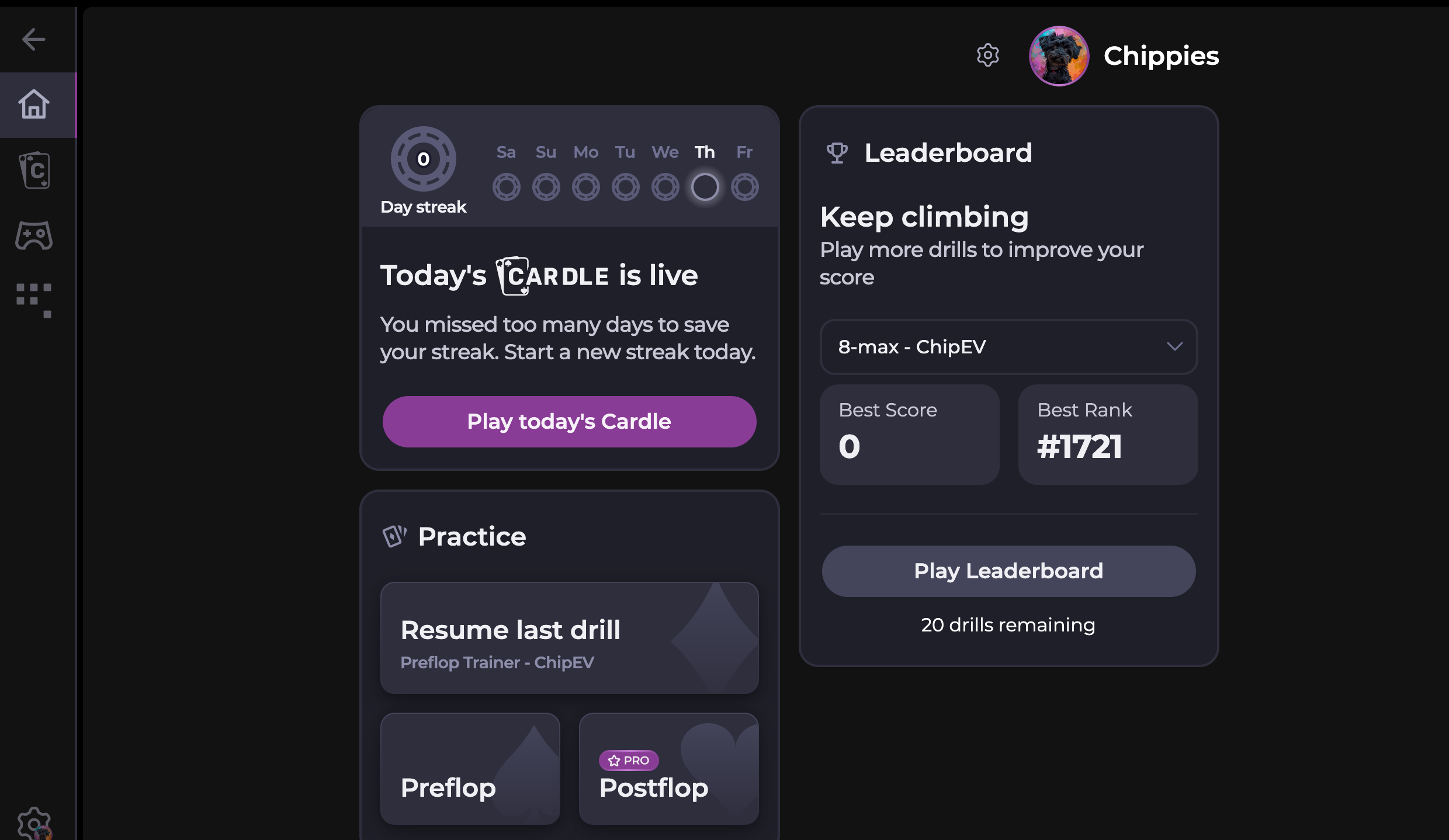
The practice widget on the home screen gives you two options:
Custom Drills (Pro)
Build a custom drill for any postflop situation. Choose the position, spot type, and board texture you want to work on, then get instant feedback on each decision. This is a Pro-only feature, so you'll need to start a free trial to access it.
Preflop GTO Trainer (Free)
The Preflop GTO Trainer is completely free and helps you sharpen your preflop decisions quickly. It's a great starting point if you're new to Lucid or want to tighten up your opening ranges before moving to postflop work.
New to Lucid? Start with the Preflop GTO Trainer and the daily Cardle. Both are free and will give you a solid baseline before you explore Pro features.
Sim Browser
The Sim Browser lets you browse full solver strategies in just a few clicks. You can view complete preflop ranges and postflop decision trees straight from the solver, without running any simulations yourself.
What's free
- All preflop ranges for every game type are completely free. No subscription required.
- 5 postflop situations per day are available on the free tier.
What's in Pro
- Unlimited postflop situations. Start a free trial of Lucid Poker Pro to browse as many postflop nodes as you want.
You can find the Sim Browser in the sidebar on desktop or the bottom navigation bar on mobile. It's listed alongside Cardle and Drills.
Use the Sim Browser after Cardle. When you finish a daily Cardle hand, tap Explore This Spot to jump straight into the solver node for that scenario.
Finding Your Way Around
Lucid's main navigation appears as a sidebar on desktop and a bottom bar on mobile. From either one, you can quickly jump between:
- Cardle for your daily quiz
- Drills for targeted practice
- Sim Browser for studying solver strategies
Settings
Tap the gear icon to open the settings panel, where you can change your color scheme, avatar, and Leaderboard display name.
Quick Start Guide
If you're opening Lucid for the first time, here's the recommended path:
-
1Play today's CardleTap Cardle from the home screen. Answer all five hands and review your score.
-
2Try the Preflop GTO TrainerRun a few rounds in the free Preflop Trainer to test your opening ranges.
-
3Browse a preflop range in the Sim BrowserOpen the Sim Browser and explore the full preflop strategy for any game type. It's free.
-
4Customize your profileTap the gear icon to set your display name, avatar, and preferred color scheme.
What's Free vs. Pro
You don't need Pro to start improving. The daily Cardle, Preflop GTO Trainer, all preflop ranges in the Sim Browser, and 5 postflop situations per day are completely free.
- Free: Daily Cardle, Preflop GTO Trainer, all preflop ranges, 5 postflop sims per day, Leaderboard
- Pro: 500+ Cardle backlog, custom postflop Drills, unlimited postflop sims
Next Steps
- Learn how your Cardle score works: How Cardle Scoring Works
- Build your first custom drill: Building Custom Poker Drills in Lucid